
A matching second monitor that doesn't make the office look sad
When we grew the marketing team in Đà Nẵng last year, the desks ended up with a patchwork of second monitors. A 23-inch Dell from 2019 next to a no-name 24-inch next to a VA panel nobody had asked for. The color temperature shifted three times across one row. Nobody cared until a new hire walked in, clocked it, and asked, politely, whether she should bring her own.
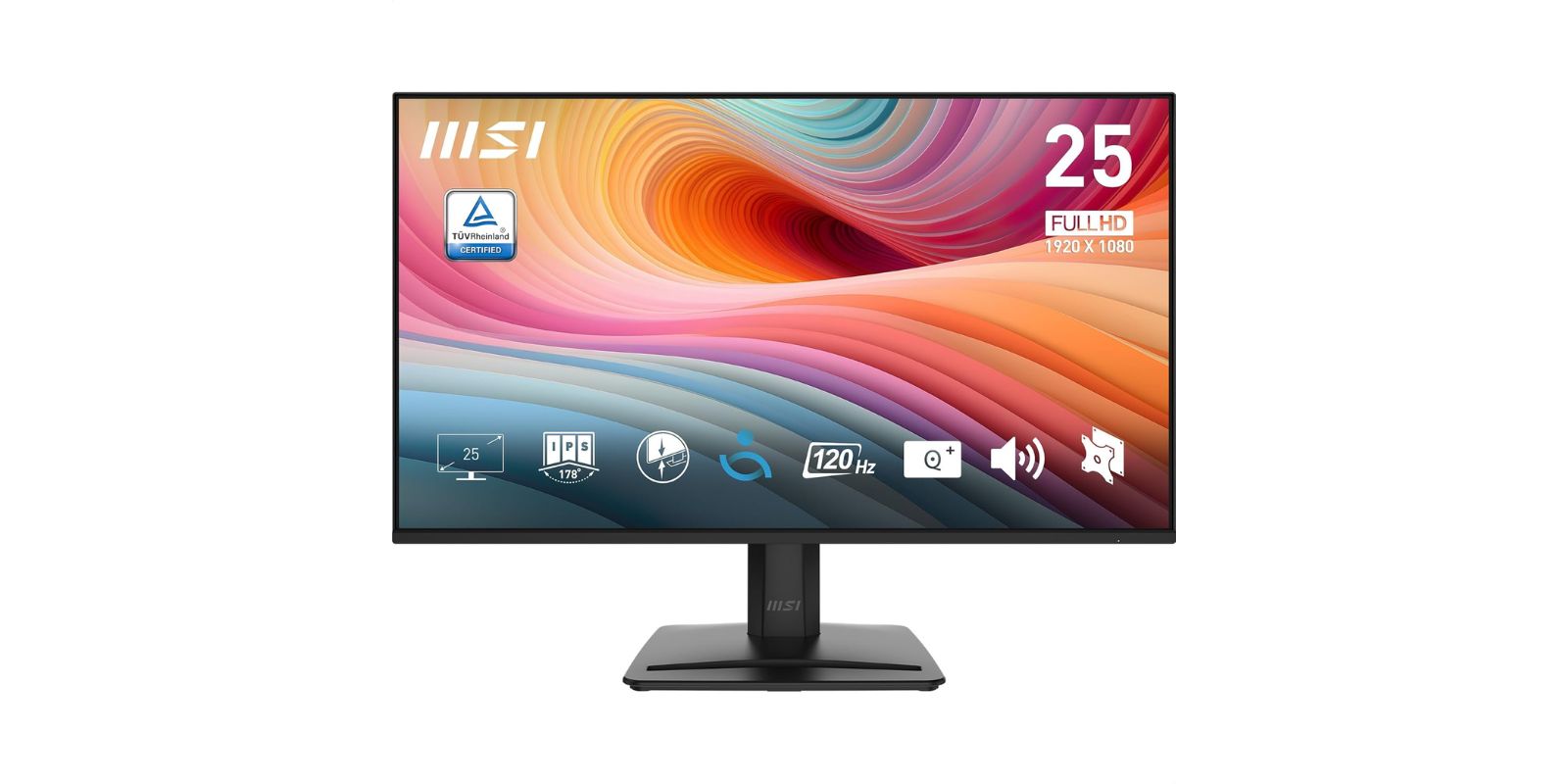
That's the moment you lose the "office aesthetic doesn't matter" argument. Thảo put a line through the budget spreadsheet and told me to pick one monitor, cheap enough that buying six wouldn't hurt, good enough that nobody would want to swap it out in a year. The MSI PRO MP251 E2 is what the research ended on. We've had six of them running for about four months now.
It is a 24.5-inch 1080p IPS panel at 120Hz, matte coating, three inputs, and a stand that tilts and nothing else. Unremarkable on paper. That is approximately the point.
Who Actually Needs This
Not everyone. If you're editing video or grading color, this is not your primary monitor. But it's a near-perfect second monitor, and a good enough primary for anyone whose main tool is a browser, a spreadsheet, or a chat window.
- 💻 You need one or several second monitors for a team of people who mostly live in browsers, slides, and docs
- 🎮 You play casual games on the side and want 120Hz without paying gaming-monitor money
- 🖥 You're replacing older 60Hz panels and want the smoothness upgrade
- 📐 You're fine with a fixed-height stand and will VESA-mount it or live with the tilt
- 🌞 Your desk faces a window and glare from glossy screens is ruining your week
What It Gets You
Matte coating, genuinely useful
The Đà Nẵng office has a wall of windows on the south side. For four hours a day the light is direct. The matte surface handles it without the washed-out gray that cheaper anti-glare coatings give you. This is the feature that quietly sold me on the first one before I committed to buying five more.
120Hz on a budget panel
You notice it on cursor movement before anything else. Scrolling is smoother. Dragging windows around is smoother. Nobody on the marketing team plays games during work, but the refresh rate still makes a felt difference on daily tasks. If you've been on 60Hz forever, you'll spend the first week quietly impressed.
Three inputs, decent speakers
HDMI, DisplayPort, and VGA. That VGA port is there because MSI knows it's selling into offices where something old is still hanging around. The built-in speakers are thin and not worth using for anything but a Teams call in a pinch, but they exist, which is more than most budget monitors offer. There's a small slot on the top of the stand that holds a phone upright, which is the kind of detail you either notice or don't.
The stand is the weak link
Tilt only. No height adjustment, no swivel, no pivot. If your chair is the wrong height, you're either VESA-mounting this (100x100mm, standard) or living with it. For the cost of the monitor, the trade is honest. For a dedicated primary workstation, it would annoy me.
💡 Tien's Note
If you're buying more than two, VESA-mount them on arms from the start. The base eats real desk space, the tilt is limited, and arms make the whole row line up at the same height, which is the thing that actually makes an office look like an office.
The Honest Version
4.7 stars across 140 reviews. 81% are five-star and they line up neatly with what we've seen: no glare, even color, easy setup, 120Hz felt as a real upgrade. One reviewer replaced two Philips IPS monitors with these and said the viewing angles were noticeably better. Another had it for a year and said it still worked perfectly as a second monitor.
Three things to know before buying.
First, the plastic back is thin. A reviewer in Egypt flagged this and I'll flag it again: don't drop the monitor, don't over-tighten VESA screws, don't be rough during setup. Our six went through a building move in March and one came out with a hairline crack near the bottom edge. Cosmetic. But on a sturdier chassis it wouldn't have happened.
Second, the stand. Tilt only. Reviews keep returning to this. If you sit lower than average you will feel it. A VESA arm or a monitor riser solves it.
Third, the eye-care features are fine, not class-leading. A reviewer who had moved from a BenQ said the low-blue-light mode on this MSI is less nuanced. Believable. Our team hasn't missed it, but if you stare at this thing eight hours a day and your eyes are the bottleneck, a BenQ or Dell at twice the cost is a real alternative.
The power cord is heavy relative to the socket it sits in. A few reviewers mention the cord pulls itself partway out of the back of the monitor under its own weight. It hasn't happened to any of ours, but the complaint is consistent enough that it's worth routing the cable with a bit of strain relief rather than letting it dangle.
Closing
The office looks like an office now. Six matching monitors, six matching stands, six mostly-identical pools of light. The new hire no longer offers to bring her own. For what a single mid-range gaming monitor costs, we outfitted the whole row and had change left for mouse pads. If you need a clean, unfussy second monitor at volume, this one does the job and then gets out of the way. Which is exactly what you want from it.
As Amazon Associates we earn from qualifying purchases. This comes at no extra cost to you.