
The week Dũng built a workstation from a parts list nobody argued about
The dev team in Đà Nẵng builds their own machines. Has done for years. Every eighteen months or so a parts list lands in their group chat, somebody argues about cooling, and a week later there's a new tower humming under a desk. Mạnh runs the spec sheet. Dũng is the one who orders first, builds first, and files the bug report on his own PC before anyone else has clicked "add to cart."
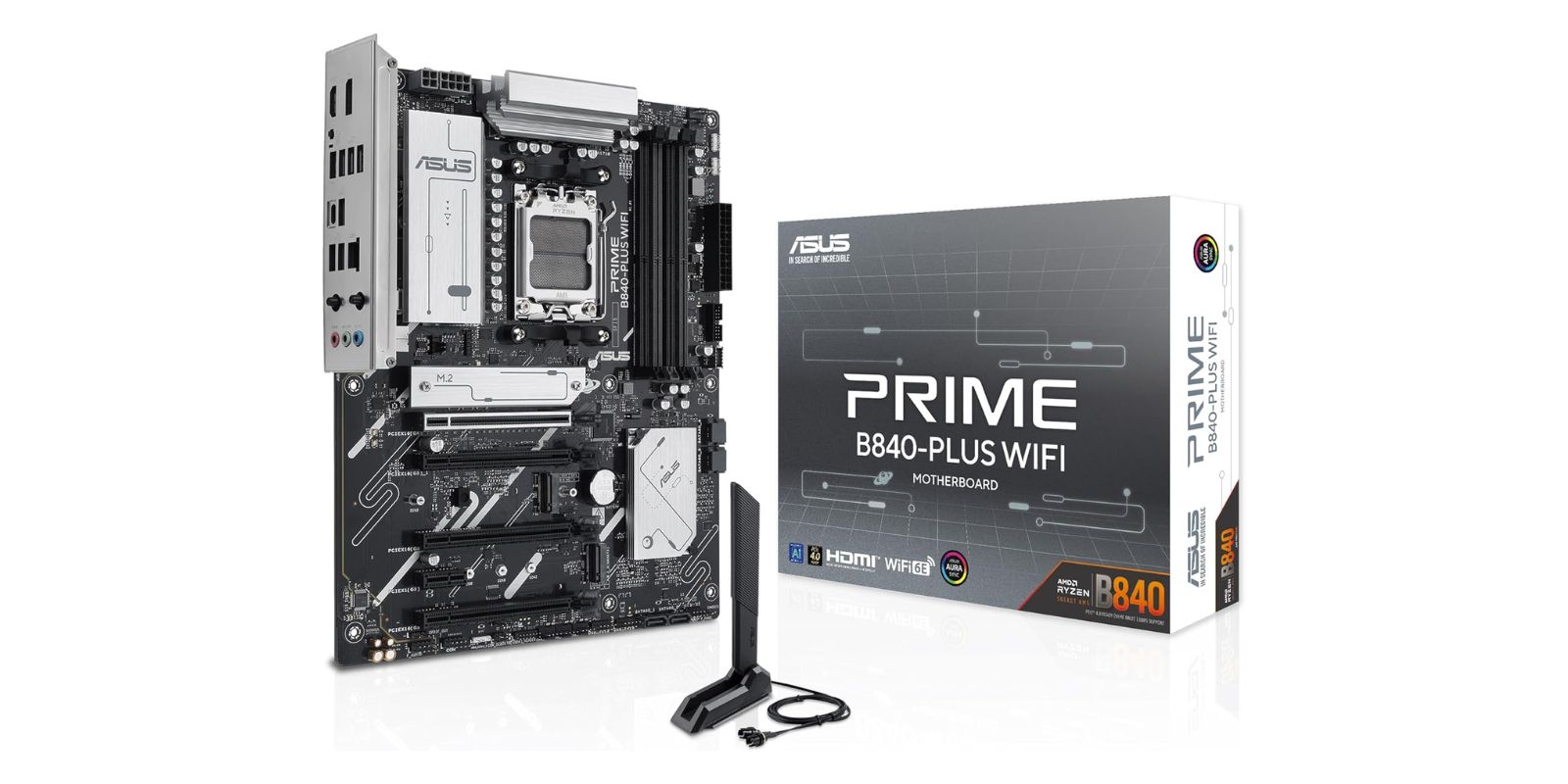
The argument is never about the motherboard. It's about the GPU, the cooler, whether the case has enough airflow, the RAM speed that nobody will notice in real work. The board is the part that gets picked in thirty seconds and forgotten. That's the tell, actually. The component everybody skips the debate on is usually the one holding the whole thing together. Dũng's latest build sits on an ASUS Prime B840-PLUS, an AM5 board he picked precisely because it was boring.
I want to flag one thing up front, because I write product copy for a living and this listing made me laugh. "Advanced AI Ready." "Designed for the future of AI computing." It's a B840 chipset on a motherboard. The phrase "AI PC" is doing the same job "5G ready" did a few years back: it's a sticker, not a feature. What you're actually buying is a competent AM5 platform that runs whatever you put on it, AI workloads included, same as it runs a compiler or a browser with too many tabs.
Who Actually Needs This
Almost none of you. Let me be honest about that. Most people reading this will never open a PC case, and there's no reason they should. If your work happens on a laptop, this is a part for a machine you'll never build. I'm writing it down because the dev team kept getting asked "what board did you use," and the answer turned out to be more interesting than the question.
- 💻 People building or rebuilding a desktop on AMD's current AM5 socket (Ryzen 9000, 8000, 7000 series)
- 🧰 First-time builders who want a board that won't surprise them, not one with features they'll never reach
- 🧠 Anyone running local models or heavier dev workloads who needs the M.2 slots and PCIe lanes, minus the enthusiast tax
- 🔌 Small teams who build their own workstations and care more about "it posts on the first try" than RGB
What It Gets You
A current platform, not a dead end
Socket AM5, DDR5, PCIe 4.0. AMD has said it intends to support AM5 for a good while, which is the real reason to pick it: Dũng can drop a newer chip in this board in two years without buying a new motherboard. That longevity is the actual value here, and it's the thing no product page bothers to sell because it's hard to put a sticker on "you won't have to do this again soon."
Storage and slots that match how devs work
Three M.2 slots is the line that made Mạnh stop scrolling. One drive for the OS, one for projects and containers, one for whatever Dũng is breaking that week. Add the PCIe 4.0 x16 slot for a GPU and you've covered a workstation's real needs. Not exotic. Just enough, in the right places.
Connectivity you actually use
Wi-Fi 6E and 2.5Gb LAN on board, so the network side is handled without an add-in card. USB 10Gbps in both Type-A and Type-C, DisplayPort and HDMI off the integrated graphics for the days you're running a chip with onboard video and no GPU installed yet. The ports cover the boring daily stuff, which is most of what a workstation does.
The small thing builders care about
BIOS Flashback. It lets you update the board's firmware with nothing but a USB stick and power, no CPU or RAM installed. On a new AM5 board paired with a newer chip, that's the difference between a clean build and a frustrating afternoon. Aura Sync RGB is there too, if you want the lights. Dũng turned them off within a day.
💡 Tien's Note
The Flashback button earned its keep on Dũng's build. He paired the board with a current-gen chip, the out-of-box BIOS didn't recognize it, and ten minutes with a USB stick and the dedicated button fixed it without borrowing an older CPU off Mạnh's desk. If you build with a brand-new processor, look for this feature on any board. It saves the exact afternoon you don't want to lose.
The Honest Version
Here's where I won't pretend. This board sits at 3.8 stars across 28 reviews. That's a low-ish rating on a thin sample, and you should read it carefully rather than dismiss it.
Two things explain a lot of it. First, it's an early, sparsely reviewed listing, so a couple of bad experiences swing the average hard when there are only 28 of them. One frustrated buyer is worth a lot more here than on a board with a thousand reviews. Second, B840 is AMD's budget chipset. It's the entry tier, which means it does fewer enthusiast things on purpose, and some buyers arrive expecting a mid-range board's overclocking headroom and extra lanes that this tier was never built to give.
What the complaints actually are, honestly:
- 🧩 BIOS and compatibility friction on first boot. A few buyers hit the new-chip-on-old-firmware wall. Flashback solves it, but if you don't know the feature exists, it reads as "the board is broken." It isn't. It's a known AM5 ritual.
- 📉 Expectation mismatch on the chipset. B840 is entry-level. If you want serious overclocking or maximum PCIe lanes, this is the wrong tier and a couple of reviews are really complaining about that, not about a defect.
- 🔢 Small sample size. 28 reviews is not enough to be confident either way. Treat the rating as a yellow flag worth researching, not a verdict.
None of that made Mạnh pull it from the list. It made him check that Dũng knew about Flashback before the box arrived. For a budget AM5 board going into a workstation that doesn't need overclocking records, the spec sheet does the job. But I'm not going to tell you the rating is fine when it's a 3.8. Go in knowing what the tier is and what the complaints are really about.
The board's been under Dũng's desk for a few weeks now, posting on the first try every morning, doing the unglamorous work of being the part nobody photographs. Which is exactly what we picked it to do.
As Amazon Associates we earn from qualifying purchases. This comes at no extra cost to you.